 Newsletters
 Contact us
- Crystal Devices
More Convenient Circuit Matching Search Page


Kyocera has updated the crystal oscillator Circuit Matching Search page.
In addition to adding links between the IC search and relevant product pages, Kyocera has also integrated return links from the product pages. Along with existing functionality, these enhancements streamline access to technical data and significantly improve the user experience.
Improved Circuit Matching Search Page
New Feature #1
Links to the relevant product pages have now been added to the Circuit Matching Search page.
Following a Circuit Matching Search, you will be able to access detailed information, including recommended component values and oscillator circuit characteristics, for the relevant products.
New Feature #2
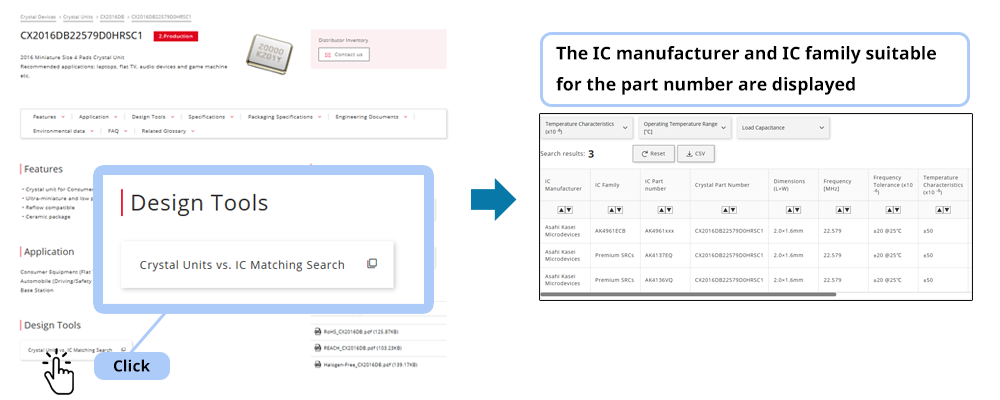
A link to the Circuit Matching Search page has now been added to the product page.
After reviewing the product specifications, you can immediately check the IC manufacturer name, IC family name, and IC model name suitable for the product.
New Feature #3
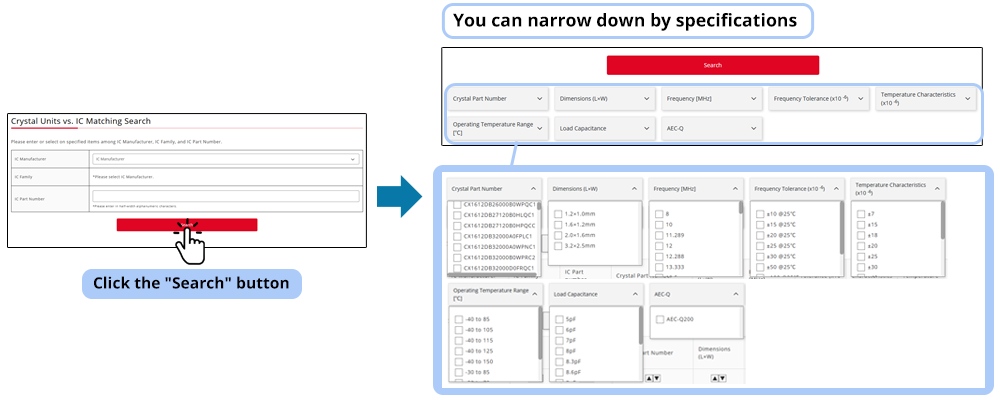
A specification filtering function has now been added to the Circuit Matching Search page.
It is possible to narrow down the search by each item, such as the part name, size, frequency, frequency tolerance deviation, temperature characteristic deviation, operating temperature range, load capacity and AEC-Q.
Using the Circuit Matching Search
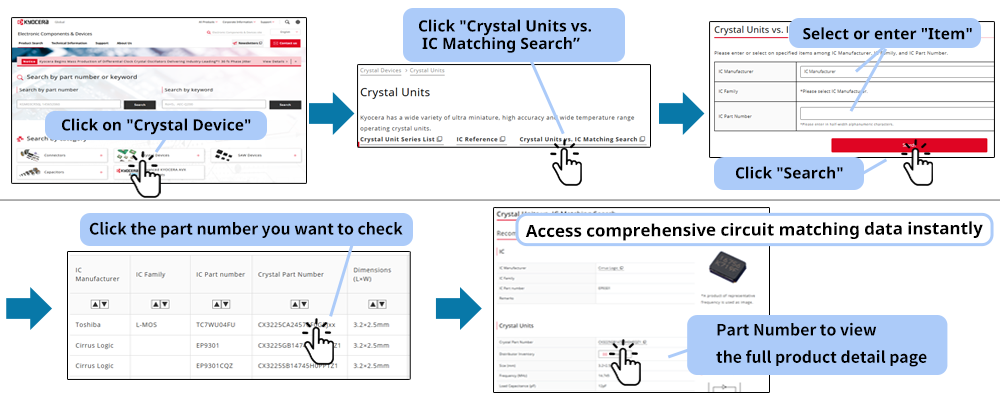
When Performing a Circuit Matching Search First
- Click on "Crystal Devices" on the Kyocera Electronic Components website.
- Select "Crystal Units" and click "Crystal Units vs. IC Matching Search."
- Select or enter "Item" and click "Search."
- Click the part number you want to check.
Access comprehensive circuit matching data instantly.
Simply click the "Crystal Part Number" to view the full product detail page.
To Perform a Circuit Matching Search After Viewing the Product Detail Page
- Click on "Crystal oscillator" in "Crystal Devices" on the Kyocera Electronic Components website.
- Search from the search conditions or enter the part number and click the displayed product's part number.
Ex: CX2016DB22579D0HRSC1 - Click the "Crystal Units vs. IC Matching Search." button in the "Design Tools".
With this, you can check the IC manufacturer or IC family suitable for the part number.
When Filtering by Specifications
- Click the "Search" button for Crystal Units vs. IC Matching Search.
(It works even if the IC manufacturer name, IC model name, etc. are not entered or selected.) - Below the search button, you will see the oscillator model number, size, frequency, frequency tolerance, temperature coefficient, operating temperature range, load capacity, and AEC-Q designation, allowing you to narrow down your search.
Click the Reset button to cancel all filtering.
Start Your Circuit Matching Search Today!
Kyocera Electronic Components Website
Crystal Devices Top Pages
Crystal Units Product List
Clock Oscillators(SPXO) Product List

The Important Information/Disclaimer is incorporated in the catalog and/or this page by reference and should be reviewed in full before placing any order or inquiry.
Related Keywords
Technical information View All


 Contact & Support


Search by part number
Search by keyword
Search by category
-
- SAW Devices
- Advanced KYOCERA AVX Components
Search by Applications
Distributor Inventory Search
Please enter the model name of Kyocera. You can search up to 3 types at the same time.